
본문
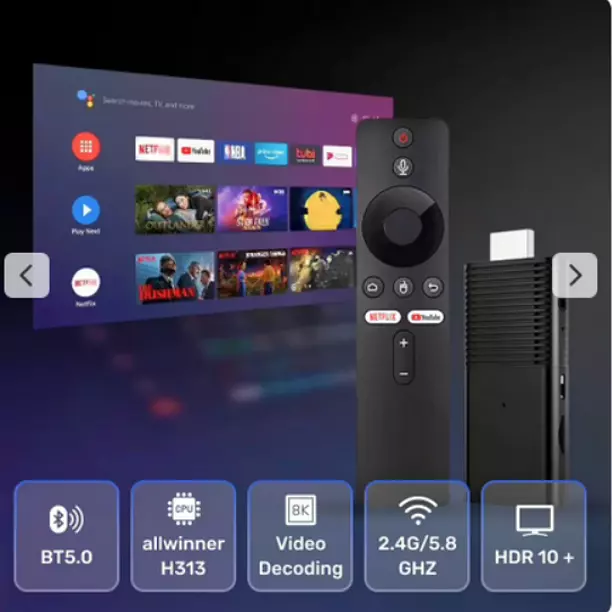 The Amazon Fire Stick is probably the most most popular choices by users and the variety of customers continues to be increasing daily. Because the Fire Stick comes with a smaller compact design, it becomes simply portable. Many customers prefer portable streaming gamers and this fireplace stick caters to all their needs. Every electronic gadget suffers from hardware/software program troubles to some extent. This could also be due to the misuse of gear or any other components. The Fire Stick can be certain to meet some problems, and the black display screen is one on that listing. It is commonly known as the Amazon Fire Stick Black Screen. And for fixing we'd like that will help you contact the Amazon Fire Stick customer assist cellphone number, but when you do not need to get help, comply with these steps. Through this article we are going to check with the easy steps to fix the Amazon Fire Stick Black Screen. Select the correct HDMI input, which you've inserted the Fire Stick into your Flixy TV Stick menu. To change the decision in your seconds, hold the 'Up' and 'Button' buttons in your Fire Stick distant for 5 seconds. If you're streaming applications in 4K Ultra HD resolution, there are possibilities of the black display screen or show Flickr. So, wait just a few seconds until it loads.

The Roku Streaming Stick Plus debuted in 2017 and spent more than three and a half years as CNET's favourite Roku and our favourite streaming machine total. It streams 4K and HDR video from Netflix , Amazon , Disney Plus, Vudu, Apple Tv and others, comes with worthwhile features like a voice distant with buttons that can control your Tv and runs Roku's best-in-class streaming system. It has the entire stuff you need and none of the fluff. So what about 4K HDR quality? The Streaming Stick Plus stays part of Roku's 2021 lineup, but it is not our favourite. The newest 4K HDR Roku, the Roku Express 4K Plus, is our new choose over the Roku Streaming Stick Plus and the most effective streamer for the money total. The newer model provides primarily the same features but prices $10 less. The Streaming Stick Plus is still a solid choice, however, and if you will discover it on sale for the same worth -- and possibly you desire its stick-like type issue -- it is price contemplating.
Its closest rivals are the Amazon Fire TV Stick 4K and the Chromecast with Google Flixy TV Stick, each of which additionally value $50. Both provide Dolby Vision HDR and superior voice assist, Flixy TV Stick thanks to Alexa and Google Assistant, respectively. Their menu methods are more fashionable-looking than Roku, with Flixy TV Stick shows and films on the house pages as opposed to simply app tiles, however they're also more cluttered and doubtlessly confusing. If you're knee-deep in the ecosystems of Amazon or Google you might recognize these devices' means to regulate good residence gear using your Flixy TV Stick distant. But Roku has support for Apple's AirPlay system, a feature Amazon and Google lack. It permits iPhones and other Apple gadgets to connect with your Flixy TV Stick wirelessly, to mirror screens, show pictures, management apps and more. The Streaming Stick Plus designed to hide behind your Tv and plug straight into a free HDMI port. If area is tight you should utilize a male-to-feminine HDMI cable or "port saver," and Roku will even send you one at no cost.
The Advanced Wireless Receiver cable plugs into the follow an old-school Mini -- not Micro -- USB connection.The Receiver in flip plugs into the provided AC adapter, or Flixy TV Stick a USB port on your Tv, for power. If you happen to elect to energy the stick out of your Tv it takes longer as well up so plugging immediately into AC is usually one of the best route. That thing in our right hand is the Advanced Wireless Receiver. You cannot use the Plus without the Receiver cable. We tried plugging an outdated USB-to-Mini-USB cable in as an alternative and obtained an error message. The Plus lacks Dolby Vision HDR, so all HDR is delivered as HDR10. Dolby Vision in comparison with HDR10. Streaming in 4K requires more bandwidth, and in the case of Netflix, a more expensive plan. The Roku Stick Plus can assist Dolby Atmos, Dolby's best in-house audio format. The costlier Roku Ultra presents most of all the same options because the Streaming Stick Plus, however adds Dolby Vision and a number of other remote-centric functions.
댓글목록
등록된 댓글이 없습니다.

 대표이사 김무현